Building a Data Analysis Agent
A Technical Deep-Dive into Task Design, Agent Architecture, Evaluation, and Training

Introduction
In my earlier post on LLM-based Agents, I tried to demystify what an agent is by reducing it to mechanics. Essentially, an agent is an LLM wrapped in an execution loop observe → decide → act → observe so it can interact with an environment, accumulate state over multiple steps, and recover from errors rather than betting everything on a single completion. We discussed the architecture of an agent and highlighted some examples of agentic systems. In this post, I’ll walk through my experiment of building a data analysis agent. The agent uses an open large language model (LLM) as its reasoning backbone and interacts with data through a set of defined tools.
The motivation of building an agent is that usually the off-the-shelf LLMs struggle with precise numerical computation, multi-step reasoning with intermediate state, and grounding responses in actual data. By providing tools (e.g. code execution) and instructing (or training) the model to use them effectively, we get reliable, verifiable answers to data questions. We intend to build an agent that can load tables, inspect schemas, write and run transformations, diagnose failures, and produce answers grounded in computation. Concretely, the task can be defined as follows:
Given a natural language question about data, and one or more CSV files containing the relevant data, produce a correct, grounded answer derived from the actual data.
A example of a query is:
Using the employee data in /data/employees.csv, what is the average salary?or asking to reason over multiple data streams
Using /data/orders.csv and /data/customers.csv, which customer segment
has the highest total revenue from completed orders?
This kind of query is where one-shot completions often fail. The model may on the right track, but a single wrong join key or filter produces a wrong answer.
Data Analysis Agent
Let’s first define the target behavior strongly, because vague definitions create vague systems. A solid data analysis agent would need to:
Multi-table reasoning: Handle queries requiring joins across multiple CSV files
Multi-step computation: Support complex analytical workflows (load → compute → aggregate → answer)
Reproducible evaluation: Consistent metrics for comparing model versions
Trainable via RL: Improve performance through reinforcement learning on generated trajectories
Agents are best understood as trajectories, not as static architectures. Let’s consider the query:
Using /data/orders.csv and /data/customers.csv, which customer segment has the highest total revenue from completed orders?If the agent behaves like a competent analyst, a typical successful trajectory is:
load both tables
inspect schema to identify join key(s), status column, revenue column, segment column
join and sanity-check
filter to completed
group by segment, sum revenue, find argmax
answer and stop
Everything below is engineered to make that trajectory natural and debuggable.
Full codes for this experiment are available at GitHub/data-analysis-agent
Agent Architecture
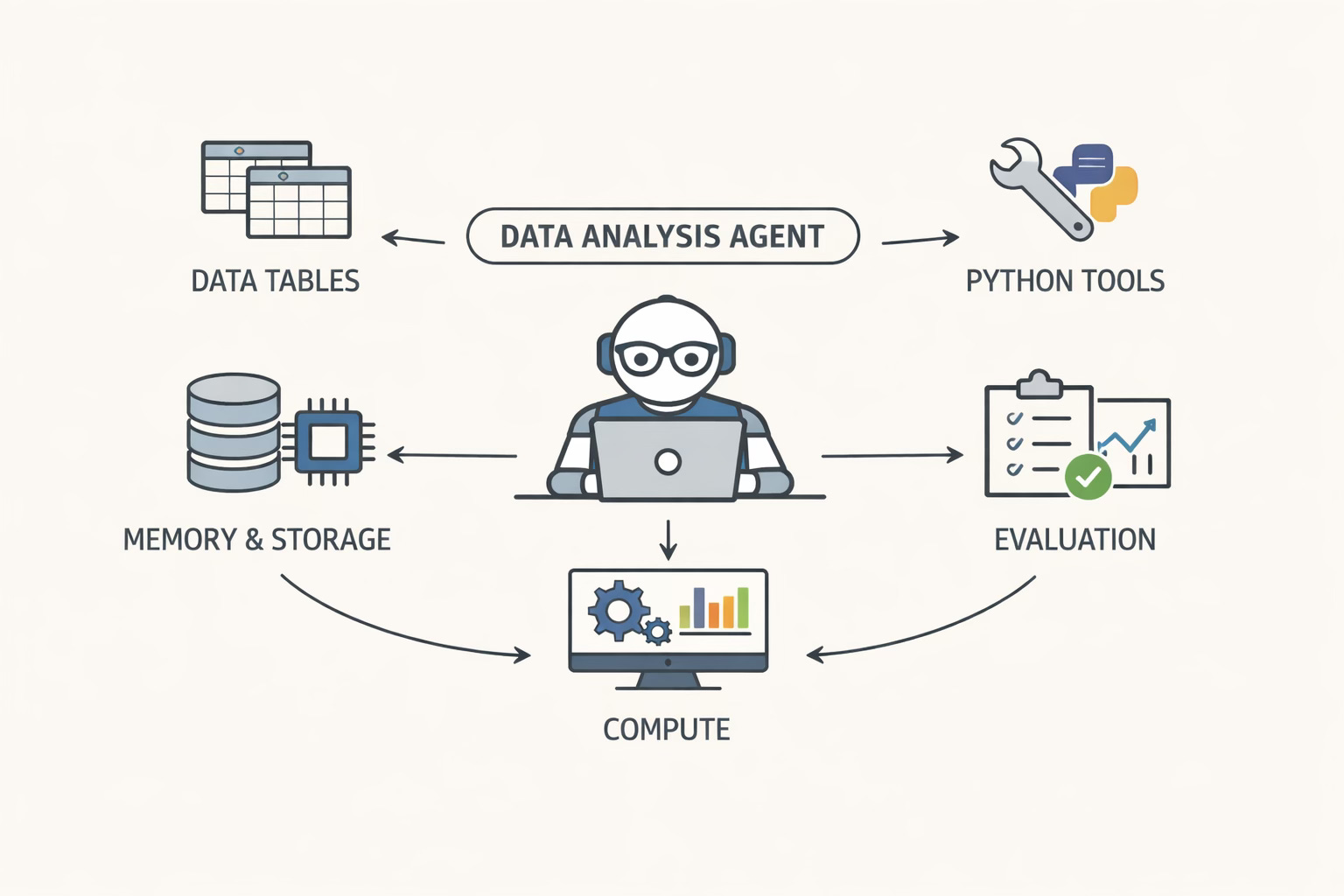
Now that we have defined the requirements of the agent in concrete terms, let us dig into the architecture of the agent. In my agents post, I framed an agent as: Policy model + tools + environment + memory + loop. I’ll stick to that structure here, but with enough technical detail that you could re-implement the system without guessing what I meant.
Policy Model
The policy model is an instruction-tuned open LLM. In my baseline configuration, I used Qwen/Qwen3-30B-A3B-Instruct-2507 as my reasoning layer. This model is top-of-the-range open model which is capable to follow a strict tool protocol. It is also small enough that iteration cycles are manageable.
The important conceptual shift is that the policy is asked to choose actions. In each step, given the current episode transcript (question + previous actions + tool outputs), it decides whether to (i) think, (ii) call a tool, or (iii) finish. This is different from the usual LLM usage where the model is instructed to ‘generate the answer’. This distinction matters for grounding. If the model is allowed to answer directly, it will generate an answer, often prematurely or totally hallucinating. We want data-grounded answers, we have to structure the interaction so that computation is the default, not the fallback.
All agent behavior is controlled through a configuration dataclass:
@dataclass
class AgentConfig:
    # Model settings
    model_name: str = "Qwen/Qwen3-30B-A3B-Instruct-2507"
    temperature: float = 0.4
    max_tokens: int = 500

    # Agent settings
    max_steps: int = 20          # Maximum reasoning steps
    max_errors: int = 3          # Consecutive errors before fallback
    max_retries_per_step: int = 2  # JSON parse retries

    # Memory settings
    max_memory_entries: int = 30
    max_context_tokens: int = 4000

    # Compute settings
    compute_timeout_seconds: int = 60
    max_result_length: int = 2000

    # Reproducibility
    seed: Optional[int] = None

    # Output
    verbose: bool = True
    trajectory_dir: Optional[str] = None
A few configuration details become surprisingly important in practice:
max_steps=20: Complex multi-table queries need more steps than simple onesmax_retries_per_step=2: LLMs occasionally produce malformed structured actions; retrying helpsmax_context_tokens=4000: Prevents context overflow while preserving historymax_errors=3:An error budget to terminate episodes that are clearly stuck.temperature=0.4:A moderate temperature to keep actions stable while still allowing some exploration during development.
These numbers are obviously not sacred, we can choose based on what works. What matters is that the system makes these constraints explicit and enforces them consistently, because they shape the distribution of trajectories we later evaluate and train on.
Tooling Interface
The tooling interface is deliberately minimal. I learned (the hard way) that tool proliferation early on increases the action space, increases failure modes, and makes debugging and training harder.
The tooling layer is implemented as a registry. Each tool has a name, a description, an argument schema, and a callable. Tools are first-class citizens with a consistent interface:
@dataclass
class Tool:
    name: str
    description: str
    fn: Callable[[Dict[str, Any], Any], str]
    parameters: Dict[str, Any]  # JSON Schema


class ToolRegistry:
    def __init__(self, tools: List[Tool]):
        self._tools = {t.name: t for t in tools}

    def call(self, name: str, args: Dict[str, Any], context: Any = None) -> str:
        if name not in self._tools:
            return f"Error: Unknown tool '{name}'"
        try:
            return self._tools[name].fn(args, context)
        except Exception as e:
            return f"Error: {type(e).__name__}: {e}"

    def names(self) -> List[str]:
        return list(self._tools.keys())

    def describe(self) -> str:
        """Generate tool descriptions for system prompt."""
        lines = []
        for t in self._tools.values():
            lines.append(f"• {t.name}: {t.description}")
        return "\n".join(lines)
Why this design:
Uniform interface:
(args: Dict, context: DataContext) -> strError isolation: Exceptions are caught and returned as error strings
Self-documenting: Tools describe themselves for the system prompt
Extensible: Adding new tools requires only implementing the function
This makes it possible to (i) inject tool specs into the system prompt, (ii) validate arguments, and (iii) log tool calls cleanly.
A practical point — tool execution must be wrapped in a consistent error boundary. Any exception inside tool code should come back as a structured error observation (including exception type), rather than crashing the agent process. Tool errors are part of the environment which the policy needs to see and learn to recover from.
This agent has four tools:
load_data: load a CSV into a named table, and return schema information (columns, inferred dtypes, shape, and a tiny preview).
compute: execute pandas/numpy code in a sandboxed, persistent session.
plan: record a plan for complex tasks (a no-op tool operationally, but useful behaviorally).
finish: terminate the episode with the final answer.
Environment Interface
The environment is the “world” the agent acts on. In this project, the environment is a persistent analysis session, represented as a DataContext with two central stores:
dataframes: a mapping from table name to DataFrame (multi-table state).
variables: a mapping for intermediate artifacts created during analysis (joined tables, grouped results, derived arrays, etc.).
The DataContext maintains state across tool calls:
class DataContext:
    def __init__(self):
        self.dataframes: Dict[str, pd.DataFrame] = {}  # Named tables
        self.variables: Dict[str, Any] = {}            # Persistent variables
        self.config: Optional[AgentConfig] = None

    def add_dataframe(self, name: str, df: pd.DataFrame):
        self.dataframes[name] = df

    def get_dataframe(self, name: str) -> Optional[pd.DataFrame]:
        return self.dataframes.get(name)

    def list_dataframes(self) -> List[str]:
        return list(self.dataframes.keys())
The persistence of variables is what makes multi-step analysis natural. A typical multi-table episode might create an intermediate dataframe in one compute call, then reuse it in later calls. Without this, the agent is forced into monolithic one-shot code generation. When compute executes code, new variables are saved to context.variables and available in subsequent compute calls:
# First compute call
compute({"code": "merged = orders.merge(customers, on='customer_id')"})

# Second compute call - 'merged' is still available
compute({"code": "result = merged.groupby('segment')['revenue'].sum()"})
The compute tool is the most important environment boundary, and its contract is intentionally strict:
The environment only returns what the code assigns to a special variable called result.
This forces the policy to structure compute calls as “small queries” whose outputs are meant to be inspected. It also prevents accidental dumping of massive intermediate tables into the transcript.
The compute environment is sandboxed and bounded. Two bounds matter the most:
timeout: each compute call has a maximum runtime (I used 60 seconds).
output truncation: the returned result is truncated to a fixed maximum length (I used ~2000 characters).
Both bounds are necessary. Without them, the agent will eventually self-sabotage by producing huge outputs or hanging on expensive computations, and you’ll stop being able to evaluate anything.
Memory
The memory, tracks conversation history, in this agent is a token-aware transcript of the episode: thoughts, actions, and observations. Tool observations (especially data previews) can be very long. Aggressive truncation and periodic summarization keep the context manageable.
Entry-level truncation. Thoughts are capped, actions are capped, and observations are capped. In my implementation, the caps were roughly:
thought ~ 800 characters,
action ~ 600 characters,
observation ~1000 characters
These numbers exist to enforce an important invariant that no single step should dominate the context.
Summarization under pressure. When the memory approaches a fraction of the context budget (I trigger at ~70%), the oldest third of entries are compressed into a summary entry, and the detailed entries are dropped. The summary is intentionally lossy, it preserves only the key outcomes and state, not every detail.
@dataclass
class MemoryEntry:
    kind: str        # "thought", "action", "observation", "summary"
    content: str
    token_estimate: int = 0


class Memory:
    def __init__(self, config: AgentConfig):
        self.entries: List[MemoryEntry] = []
        self.config = config
        self._total_tokens = 0

    def _estimate_tokens(self, text: str) -> int:
        return len(text) // 4  # Rough approximation

    def add_thought(self, thought: str):
        content = thought[:800]
        tokens = self._estimate_tokens(content)
        self.entries.append(MemoryEntry("thought", content, tokens))
        self._total_tokens += tokens
        self._maybe_summarize()

    def add_action(self, action: str):
        content = action[:600]
        tokens = self._estimate_tokens(content)
        self.entries.append(MemoryEntry("action", content, tokens))
        self._total_tokens += tokens
        self._maybe_summarize()

    def add_observation(self, observation: str):
        content = observation[:1000]
        tokens = self._estimate_tokens(content)
        self.entries.append(MemoryEntry("observation", content, tokens))
        self._total_tokens += tokens
        self._maybe_summarize()

    def _maybe_summarize(self):
        """Compress old entries when approaching token limit."""
        if self._total_tokens < self.config.max_context_tokens * 0.7:
            return
        if len(self.entries) < 8:
            return

        # Summarize oldest third
        split_point = len(self.entries) // 3
        old_entries = self.entries[:split_point]

        actions = [e.content for e in old_entries if e.kind == "action"]
        observations = [e.content[:100] for e in old_entries if e.kind == "observation"]

        summary = f"[Earlier: {len(actions)} actions. Key results: {'; '.join(observations[:3])}...]"

        removed_tokens = sum(e.token_estimate for e in old_entries)
        self.entries = [MemoryEntry("summary", summary)] + self.entries[split_point:]
        self._total_tokens = self._total_tokens - removed_tokens + len(summary)//4

    def format(self) -> str:
        """Format for inclusion in prompt."""
        lines = []
        for entry in self.entries:
            prefix = {"thought": "[Thought]", "action": "[Action]",
                     "observation": "[Observation]", "summary": "[Summary]"}
            lines.append(f"{prefix.get(entry.kind, '')} {entry.content}")
        return "\n".join(lines)
In addition to fitting in context, this truncation also changes behavior. An agent that knows older details will be summarized away becomes more economical with tool calls and more deliberate about when it has enough information to finish.
Agent Loop
This is where everything comes together. With tools, environment, and memory defined, the loop becomes the standard agent orchestrator.
Build a prompt from system instructions (role + tool protocol), tool descriptions, the user question, and the formatted memory transcript.
def build_messages(
    request: str,
    memory: Memory,
    tools: ToolRegistry,
    retry: bool = False
) -> List[Dict[str, str]]:
    """Build message list for LLM."""
    messages = [
        {"role": "system", "content": SYSTEM_PROMPT.format(tools=tools.describe())},
        {"role": "user", "content": request},
    ]

    history = memory.format()
    if history:
        messages.append({
            "role": "assistant",
            "content": f"Progress so far:\n{history}\n\nContinuing:"
        })

    # Retry prompt on parse failure
    if retry:
        messages.append({"role": "user", "content": RETRY_PROMPT})

    return messages
Ask the policy model to generate exactly one structured action.
SYSTEM_PROMPT = """You are a data analysis assistant that handles complex multi-step analysis tasks.

## Available Tools
{tools}

## Response Format
Respond with ONE JSON object per turn:

### 1. THINK
{{"type": "think", "content": "Let me analyze what's needed..."}}

### 2. PLAN
{{"type": "tool", "name": "plan", "args": {{"plan": "1. Load both datasets\\n2. Merge on key..."}}}}

### 3. TOOL
{{"type": "tool", "name": "load_data", "args": {{"path": "file.csv", "name": "sales"}}}}
{{"type": "tool", "name": "compute", "args": {{"code": "result = sales.merge(hr, on='id')"}}}}

### 4. FINISH
{{"type": "tool", "name": "finish", "args": {{"answer": "Based on my analysis..."}}}}

## IMPORTANT
- Respond with ONLY a JSON object, no other text
- For multi-step analysis, break down into smaller compute calls
- Always set 'result = ...' to see intermediate outputs"""
Parse the action. If it’s a tool call, execute it and append the observation. If it’s finish, stop.
def parse_action(raw: str, tool_names: List[str]) -> AgentAction:
    raw = raw.strip()
    if not raw:
        return AgentAction(kind="error", thought="Empty response", raw=raw)

    json_objects = extract_all_json(raw)

    if json_objects:
        for obj in json_objects:
            action = json_to_action(obj, tool_names)
            if action.kind != "error":
                action.raw = raw
                return action
        return json_to_action(json_objects[0], tool_names)

    return AgentAction(kind="error", thought="Cannot parse response", raw=raw)
Enforce budgets: max steps, parse retries, error budget.
A strict action protocol is non-negotiable if you want reliability and trainability. In my system, the policy emits one JSON object per step. Conceptually there are two shapes:
a “think” action, which is stored in memory but does not call tools, and
a “tool” action, which names a tool and provides arguments.
finish is implemented as a tool action as well, because termination is part of the action space. This ends up being useful e.g. we can measure “does the policy stop appropriately?” and can reward efficiency.
This strict protocol mirrors the recommendation I made in the earlier agents post — avoid brittle string parsing and require structured tool invocation.
Example
Let’s consider an example of a concrete multi-table trajectory. Here’s what an ideal structured interaction might look like:
Plan
{"type":"tool","name":"plan","args":{"plan":"1) Load orders and customers\n2) Inspect schemas for join key + revenue/status columns\n3) Merge\n4) Filter completed\n5) Group by segment and sum revenue\n6) Return the top segment"}}Load Tables
{"type":"tool","name":"load_data","args":{"path":"/data/orders.csv","name":"orders"}}{"type":"tool","name":"load_data","args":{"path":"/data/customers.csv","name":"customers"}}Join + Sanity
{"type":"tool","name":"compute","args":{"code":"merged = orders.merge(customers, on='customer_id', how='inner')\nresult = {'shape': merged.shape, 'cols': list(merged.columns)[:20]}"}}Aggregate and pick winner
{"type":"tool","name":"compute","args":{"code":"completed = merged[merged['status'].astype(str).str.lower() == 'completed']\nseg_rev = completed.groupby('segment')['revenue'].sum().sort_values(ascending=False)\nresult = {'top_segment': seg_rev.index[0], 'top_revenue': float(seg_rev.iloc[0])}"}}Finish
{"type":"tool","name":"finish","args":{"answer":"The customer segment with the highest total revenue from completed orders is **Enterprise** (total revenue ≈ $1,234,567.89)."}}
That is the behaviour we are engineering the agent toward: small compute steps, inspectable outputs, and a final answer grounded in computed values.
Evaluation
Once the agent can run episodes, the real question becomes: does it work, and how do we measure progress?
Manually authoring large datasets of (question, ground truth) pairs doesn’t scale and tends to be narrow. So, I used a synthetic data generation setup which involves a “LLM proposes questions, environment validates them” pipeline.
Data Generation
The pipeline looks like this:
Schema extraction. For each dataset (one or more CSV files), extract a compact schema summary: table names, column names, inferred dtypes, and a few representative values. This schema is the context provided to the question generator, and it’s also the context the agent sees during execution (via
load_data).def extract_schema(csv_paths: Dict[str, str], sample_rows: int = 3) -> str: """ Extract schema information from CSVs for LLM prompt. Returns formatted string describing all tables. """ schema_parts = [] all_columns = {} for name, path in csv_paths.items(): df = pd.read_csv(path) all_columns[name] = list(df.columns) col_info = [] for col in df.columns: dtype = df[col].dtype if pd.api.types.is_numeric_dtype(dtype): col_info.append(f" - {col} ({dtype}): range [{df[col].min():.2f}, {df[col].max():.2f}]") else: unique = df[col].nunique() examples = df[col].dropna().unique()[:3] col_info.append(f" - {col} ({dtype}): {unique} unique, e.g., {list(examples)}") schema_parts.append(f""" Table: {name} Path: {path} Rows: {len(df)} Columns: {chr(10).join(col_info)} Sample: {df.head(sample_rows).to_string(index=False)} """) # Detect potential join columns join_hints = [] col_to_tables = {} for table, cols in all_columns.items(): for col in cols: col_lower = col.lower() if col_lower not in col_to_tables: col_to_tables[col_lower] = [] col_to_tables[col_lower].append(table) for col, tables in col_to_tables.items(): if len(tables) > 1: join_hints.append(f" - '{col}' appears in: {', '.join(tables)}") if join_hints: schema_parts.append(f"\nPotential Join Columns:\n{chr(10).join(join_hints)}") return "\n".join(schema_parts)LLM-based query generation. The generator produces questions across a range of categories (single-table, multi-table, conditional, comparative, multi-step). For each question, I also generate a candidate solution sketch (not for the agent to see, but for validation and ground truth materialization).
PROMPT_TEMPLATE = """You are generating analytical questions for a pandas data analysis task.

DATASET SCHEMA:
{schema}

Generate {n_queries} diverse questions. Mix these categories and difficulties:

Categories:
- single_table: Basic aggregation on one table
- multi_table: Requires joining tables
- conditional: Has filtering conditions
- comparative: Compares groups
- multi_step: Requires 2+ sequential operations

Difficulties: easy, medium, hard

Output format (strict - follow exactly):

---
QUESTION: <natural language question that includes file paths>
CATEGORY: <category>
DIFFICULTY: <difficulty>
CODE:
```python
<complete pandas code that prints the answer>
```
---

Rules:
1. Use pd.read_csv() with exact paths from schema
2. QUESTION must include file paths (e.g., "Using /data/sales.csv, ...")
3. CRITICAL - ANSWER FORMAT: Print SIMPLE answers:
   - Single values: print(85000.50) or print("Engineering")
   - "Which X has highest Y": print("California")
   - "Top N": print(["A", "B", "C"])
   - "Value by category": print({{"Engineering": 85000, "Sales": 72000}})
   - NEVER print raw DataFrames - convert to simple Python types
"""


def generate_queries(schema: str, n_queries: int, llm_client) -> List[Dict]:
    """Generate queries using LLM."""
    prompt = PROMPT_TEMPLATE.format(schema=schema, n_queries=n_queries)

    response = llm_client.generate(prompt, max_tokens=4000, temperature=0.8)

    return parse_generated_queries(response)


def parse_generated_queries(response: str) -> List[Dict]:
    """Parse LLM response into structured queries."""
    queries = []

    # Split by separator
    blocks = re.split(r'\n---\n', response)

    for block in blocks:
        if not block.strip():
            continue

        # Extract components
        question_match = re.search(r'QUESTION:\s*(.+?)(?=\nCATEGORY:)', block, re.DOTALL)
        category_match = re.search(r'CATEGORY:\s*(\w+)', block)
        difficulty_match = re.search(r'DIFFICULTY:\s*(\w+)', block)
        code_match = re.search(r'```python\s*(.+?)\s*```', block, re.DOTALL)

        if all([question_match, category_match, difficulty_match, code_match]):
            queries.append({
                'query': question_match.group(1).strip(),
                'category': category_match.group(1).strip().lower(),
                'difficulty': difficulty_match.group(1).strip().lower(),
                'code': code_match.group(1).strip(),
            })

    return queries
Validation pipeline. The candidate solution is executed against the actual CSVs in the same compute environment. If execution fails, the query is rejected. If the query is ambiguous, degenerate, or non-deterministic (ties without tie-breaks, empty results, trivial outputs), it is rejected. If it passes, the computed answer is stored as structured ground truth.
def validate_query(query: Dict) -> Tuple[bool, str, Any]:
    """
    Validate a generated query.
    Returns (is_valid, reason, answer).
    """
    code = query.get('code', '')
    question = query.get('query', '')

    # 1. Safety check
    unsafe_patterns = ['import os', 'subprocess', 'exec(', 'eval(', 'open(', '__']
    for pattern in unsafe_patterns:
        if pattern in code:
            return False, f"Unsafe pattern: {pattern}", None

    # 2. Execute and get answer
    try:
        answer = execute_code(code)
    except Exception as e:
        return False, f"Execution error: {e}", None

    # 3. Check answer is non-trivial
    if answer is None:
        return False, "No answer produced", None
    if isinstance(answer, (list, dict)) and len(answer) == 0:
        return False, "Empty answer", None
    if isinstance(answer, float) and (np.isnan(answer) or np.isinf(answer)):
        return False, "Invalid numeric answer", None

    # 4. Check question quality
    if len(question) < 20:
        return False, "Question too short", None
    trivial_patterns = ['show', 'display', 'print the table', 'list all']
    if any(p in question.lower() for p in trivial_patterns):
        return False, "Trivial question", None

    # 5. Determinism check - run twice, compare
    try:
        answer2 = execute_code(code)
        if str(answer) != str(answer2):
            return False, "Non-deterministic", None
    except:
        return False, "Determinism check failed", None

    return True, "OK", answer


def execute_code(code: str) -> Any:
    """Execute pandas code and return printed output."""
    stdout = io.StringIO()
    namespace = {'pd': pd, 'np': np}

    with redirect_stdout(stdout):
        exec(code, namespace)

    output = stdout.getvalue().strip()

    # Try to parse as Python literal
    try:
        return eval(output)
    except:
        return output
As a sanity check, in one run of 100 generated queries, 82 survived validation and filtering; 8 were rejected due to execution errors; 4 were rejected as non-deterministic; and 6 were rejected as trivial. Those rejection categories are not incidental — they map exactly to the failure modes you want to eliminate before you start trusting your evaluation numbers.
The generated data is stored as JSON with structured ground truth:
{
  "id": "q_0001",
  "query": "Using /data/employees.csv, what is the average salary by department?",
  "category": "single_table",
  "difficulty": "easy",
  "ground_truth": {
    "Engineering": 77310.64,
    "Finance": 71550.48,
    "HR": 87907.75,
    "Marketing": 77900.67,
    "Sales": 74914.36
  },
  "code": "df = pd.read_csv('/data/employees.csv')\nprint(df.groupby('department')['salary'].mean().to_dict())"
}
Evaluation
Each evaluation episode produces:
the full trajectory (actions + observations),
the final answer string,
structured ground truth,
and a verdict (correct/incorrect/failure), plus diagnostics.
An example trajectory looks like:
{
  "task": "What is the average salary by department?",
  "steps": [
    {
      "step_num": 0,
      "action_type": "tool",
      "action_content": {"name": "load_data", "args": {"path": "/data/employees.csv", "name": "emp"}},
      "observation": "✓ Loaded '/data/employees.csv' as 'emp'\n  Shape: 200 rows × 8 columns..."
    },
    {
      "step_num": 1,
      "action_type": "tool",
      "action_content": {"name": "compute", "args": {"code": "result = emp.groupby('department')['salary'].mean()"}},
      "observation": "Result:\ndepartment\nEngineering    77310.64..."
    },
    {
      "step_num": 2,
      "action_type": "tool",
      "action_content": {"name": "finish", "args": {"answer": "The average salary by department is: Engineering: $77,310.64..."}},
      "observation": "The average salary by department is...",
      "reward": 1.17
    }
  ],
  "final_answer": "The average salary by department is...",
  "success": true,
  "reward": 1.17,
  "is_correct": true,
  "ground_truth": {"Engineering": 77310.64, ...}
}
The hard part is grading because the ground truth is structured (a number, a string, a list, or a dictionary of group → value), while the agent answer is prose.
So evaluation involves answer extraction and comparison with ground truth:
For numeric truth, extract numbers from the answer and compare within tolerance.
For categorical truth, compare normalized strings.
For lists, compare set overlap and, where relevant, order.
For dictionaries (grouped outputs), check key presence and value matches.
def compare_answers(ground_truth: Any, agent_answer: Any, tolerance: float = 0.01) -> Tuple[bool, str]:
    """
    Compare structured ground truth with natural language agent answer.
    Returns (is_correct, explanation).
    """
    agent_answer = str(agent_answer) if agent_answer is not None else ""
    agent_lower = agent_answer.lower().replace(",", "").replace("$", "")

    def number_in_text(num, text, tol=tolerance):
        """Check if a number appears in text with tolerance."""
        if isinstance(num, float):
            patterns = [str(round(num, 2)), f"{num:.2f}", f"{num:.1f}", f"{num:.0f}"]
            text_clean = text.replace(",", "")

            # Exact pattern match
            for p in patterns:
                if p in text_clean:
                    return True

            # Fuzzy: find all numbers and check if any are close
            numbers_in_text = re.findall(r'[\d.]+', text_clean)
            for n in numbers_in_text:
                try:
                    if abs(float(n) - num) / max(abs(num), 1) < tol:
                        return True
                except:
                    pass
            return False
        return str(num) in text

    def string_in_text(s, text):
        return s.lower() in text.lower()

    # Single numeric value
    if isinstance(ground_truth, (int, float)):
        if number_in_text(ground_truth, agent_lower):
            return True, "Value found in answer"
        return False, f"Expected {ground_truth}, not found"

    # String value
    if isinstance(ground_truth, str):
        if string_in_text(ground_truth, agent_answer):
            return True, "String found in answer"
        return False, f"Expected '{ground_truth}', not found"

    # Dictionary (most common for grouped results)
    if isinstance(ground_truth, dict):
        found_keys = sum(1 for k in ground_truth if string_in_text(str(k), agent_answer))
        found_values = sum(1 for v in ground_truth.values()
                         if (isinstance(v, (int, float)) and number_in_text(v, agent_lower))
                         or string_in_text(str(v), agent_answer))

        total = len(ground_truth)
        if found_keys >= total * 0.8 and found_values >= total * 0.8:
            return True, f"Found {found_keys}/{total} keys, {found_values}/{total} values"
        return False, f"Found {found_keys}/{total} keys, {found_values}/{total} values"

    # List
    if isinstance(ground_truth, list):
        found = sum(1 for item in ground_truth
                   if (isinstance(item, (int, float)) and number_in_text(item, agent_lower))
                   or string_in_text(str(item), agent_answer))

        total = len(ground_truth)
        if found >= total * 0.8:
            return True, f"Found {found}/{total} items"
        return False, f"Found {found}/{total} items"

    return False, "Unknown ground truth type"
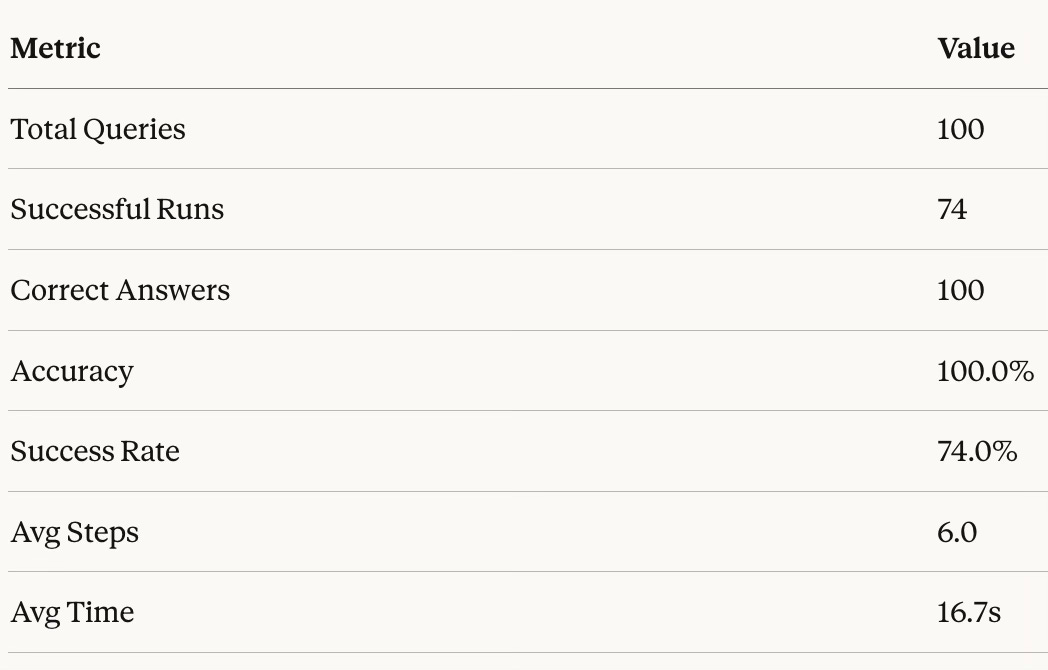
In addition to correctness, I track operational metrics because agent quality is not just “got it right once”:
episode success rate (did it terminate cleanly vs crash/timeout),
tool-call validity rate (structured actions parsed and executed),
average steps per episode,
error rate (tool errors, parse errors),
and a breakdown by query category and difficulty.
These are the metrics that tell you whether an agent is improving as a system, not just as a language model.
Results
Modern AI Stack
One can surely implement this agent in the modern AI stack using an API and the native tool calling abilities of the frontier models. This saves a lot of effort in parsing responses to extract tool invocation and in enforcing strict JSON schema.
1. MCP Instead of Custom Tool Registry
Our ToolRegistry is essentially a hand-rolled version of what MCP standardizes. With MCP:
The
load_data,compute,schema,finishtools would become an MCP serverThe protocol handles serialization, error propagation, and tool discovery
Could compose with other MCP servers (databases, APIs, visualization tools) without rewriting your agent loop
Multiple agents or UIs could use the same data analysis server
The key insight: MCP separates “what tools exist” from “how the agent uses them.”
2. Native Tool Calling vs. JSON Parsing
Instead of doing manual JSON extraction with regex fallbacks and retry loops, native tool calling has advantages:
Returns structured tool calls directly (no parsing)
Handles malformed outputs at the API level
Supports parallel tool calls when appropriate
This would eliminate parse_action, RETRY_PROMPT, and related retry logic.
3. Execution Environment
The minimal execution environment works but has trade-offs:
Security concerns for untrusted queries
State can get corrupted if compute crashes mid-execution
Hard to scale horizontally
Modern alternatives:
E2B - sandboxed code execution with persistent sessions
Modal - serverless containers that can hold state
Jupyter kernel protocol - gives you a real IPython environment with proper state
4. Observability & Debugging
The Trajectory setup we have is useful and informative, but tools like LangSmith/Braintrust give:
Cost tracking per run
Latency breakdowns
Automatic evaluation datasets from production traffic
Comparison across model versions
Conclusion
In this work, we built from the abstract idea of an agent (LLM + tools) to a concrete, engineered system. By wrapping a policy model in a persistent DataContext, enforcing strict JSON action protocols, and bounding the execution environment, we transform the LLM from a probabilistic text generator into a stateful reasoning engine.
The architecture described here tries to solve the fundamental friction of using LLMs for data tasks: grounding. By forcing the model to interact with a Python sandbox, we ensure that every answer is backed by execution. The memory management and error recovery loops turn brittle one-shot attempts into resilient, multi-step workflows.
Perhaps the most important contribution of this system is the data factory we created. By building a “rigorous” validation pipeline which involves generating queries, executing them to find ground truth, and strictly evaluating the agent’s trajectories, this paves the way for the evaluation component (the hardest part) of building better agents.
This evaluation harness is the bridge to the next level of performance. Once we can reliably score trajectories and distinguish between a “lucky guess” and a “derived answer,” we can stop relying solely on prompt engineering. We can start training. In future iterations, this setup allows us to apply Reinforcement Learning (specifically techniques like Group Relative Policy Optimization) to directly optimize the policy for correct, efficient, and robust data analysis. The architecture we built today is the gymnasium where that training will happen.
If you find this post useful, I would appreciate if you can cite it as:
@misc{verma2026data-analysis-agent,
  title={Building a Data Analysis Agent
  year={2026},
  url={\url{https://januverma.substack.com/p/building-a-data-analysis-agent}},
  note={Incomplete Distillation}
}